

交易中跟踪止盈止损的设计
在社群讨论的话题中经常会看到有关跟踪止盈止损设计的问题与交流,有很多程序化交易入门的同学也会经常咨询这类设计如何实现。那么本篇我们就来一起探讨一下有关于策略中跟踪止盈、止损的设计思路和具体实现。
TradingView的Pine语言中的strategy.exit函数跟踪止损止盈
为了易于理解,我们从最简单TradingView中Pine语言的跟踪止损、止盈功能入手。在优宽量化已经支持了Pine语言,不仅可以回测也可以实盘。我们就可以很方便的来观察TradingView的Pine语言中strategy.exit函数的跟踪止损、止盈的具体行为。我们首先来看一个简单的Pine语言测试代码:
pine
/*backtest
start: 2022-09-14 09:00:00
end: 2022-09-16 15:00:00
period: 1m
basePeriod: 1m
exchanges: [{"eid":"Futures_CTP","currency":"FUTURES"}]
args: [["RunMode",1,360008],["ContractType","rb2301",360008]]
*/
strategy("test", overlay = true)
varip a = na
varip highPrice = na
varip isTrade = false
varip offset = 30
if not barstate.ishistory and not isTrade
strategy.entry("test 1", strategy.long, 1)
strategy.exit("exit 1", "test 1", 1, trail_price=close+offset, trail_offset=offset)
a := close + offset
runtime.log("每点价格为:", syminfo.mintick, ",当前close:", close)
isTrade := true
if close > a and not barstate.ishistory
highPrice := na(highPrice) ? close : highPrice
highPrice := close > highPrice ? close : highPrice
plot(a, "trail_price 触发线")
plot(strategy.position_size>0 ? highPrice : na, "当前最高价")
plot(strategy.position_size>0 ? highPrice-syminfo.mintick*offset : na, "移动止损触发线")
这个Pine语言策略比较简单,在实时K线BAR阶段直接下一个买入单开多持仓。然后立即下一个计划平仓单,给这个计划平仓单设置跟踪止盈/止损参数。因为我们只测试一次开仓、然后计划单平仓,所以代码中我设计了一个isTrade变量标记,执行一次之后就赋值true,下次就不会再次进入这个开仓、平仓逻辑了。然后使用plot函数画图记录各个时刻的一些数据,便于观察。
Pine语言中实现跟踪止损、止盈的语句主要是:
            pine

            strategy.exit("exit 1", "test 1", 1, trail_price=close+offset, trail_offset=offset)
1、trail_price参数为触发跟踪止损、止盈的价格,测试中我们使用了当时的收盘价close,加上一个偏移量offset。怎么区分多头持仓还是空头持仓的跟踪止盈、止损触发价格呢?strategy.exit函数会要求指定一个标签,来确定是对哪个仓位进行执行跟踪止损止盈计划单。我们使用strategy.entry("test 1", strategy.long, 1)函数开了一个多头仓位,指定了标签为test 1,所以在strategy.exit函数调用时我们也传入了这个标签。那么Pine语言脚本就知道是要对这个标签为test 1的多头仓位执行跟踪止损、止盈计划单了。
当对多头持仓使用trail_price参数时,是当价格高于这个trail_price价格时才会触发跟踪止损止盈。空头持仓则反之。
2、trail_offset参数为跟踪止损、止盈偏移量,跟踪止损止盈时会时时刻刻记录出现过的最高/最低价格,用来动态调整跟踪止盈止损线(注意,不是触发启动跟踪止损止盈行为的线,是执行跟踪止损止盈的线)。拿本例子中开多仓之后跟踪止损止盈来说,这里就会监控行情出现的最高价格,当价格回撤到距离最高价格超过trail_offset参数设置的值时就会立即平仓止盈止损。如果是空头仓位的跟踪止损止盈,那么方向相反。
我们通过这个演示代码回测显示来具体说明:
因为测试的rb合约价格每跳为1元,我们设置了参数offset为30即30元距离,激活跟踪止损止盈计划单的价格就为close+30。然后当行情价格超过这个价格(close+30)之后就会进行跟踪止损止盈,记录最高价。当价格低于止损止盈触发线(记录的最高价-30)时,立即平仓止损止盈。
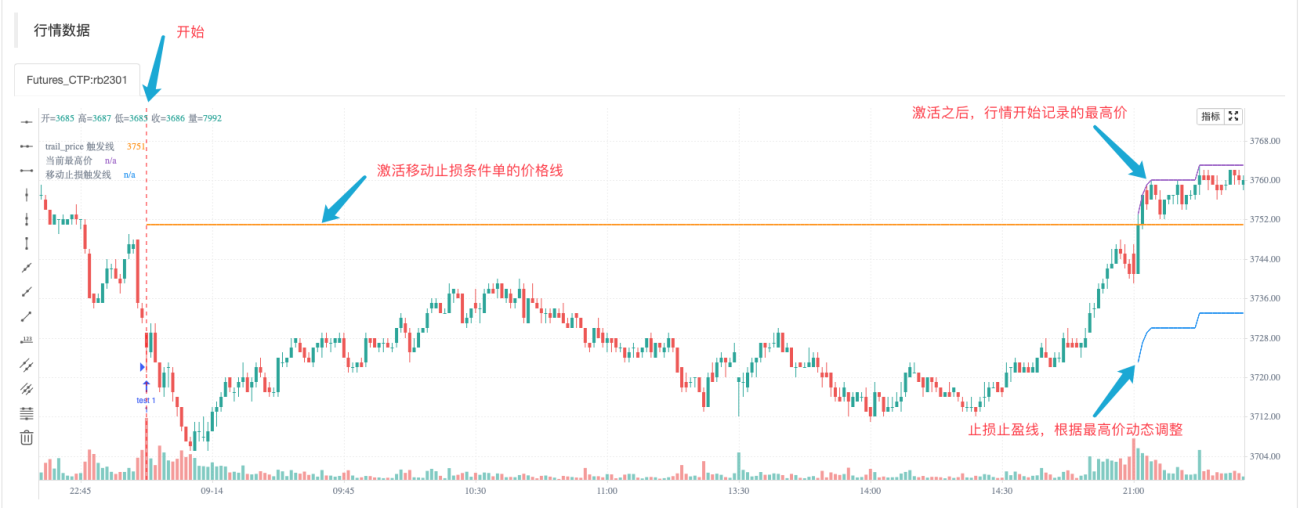
可以看到策略开始执行时马上开多仓,然后设置了触发移动止盈止损条件单的触发价格(颜色为土黄色的触发线)。之后期间没有任何操作,待到价格上升超过土黄色线,开始激活跟踪止盈止损条件单。开始记录此后行情的最高价(紫色),根据最高价动态调整止损止盈线(蓝色)
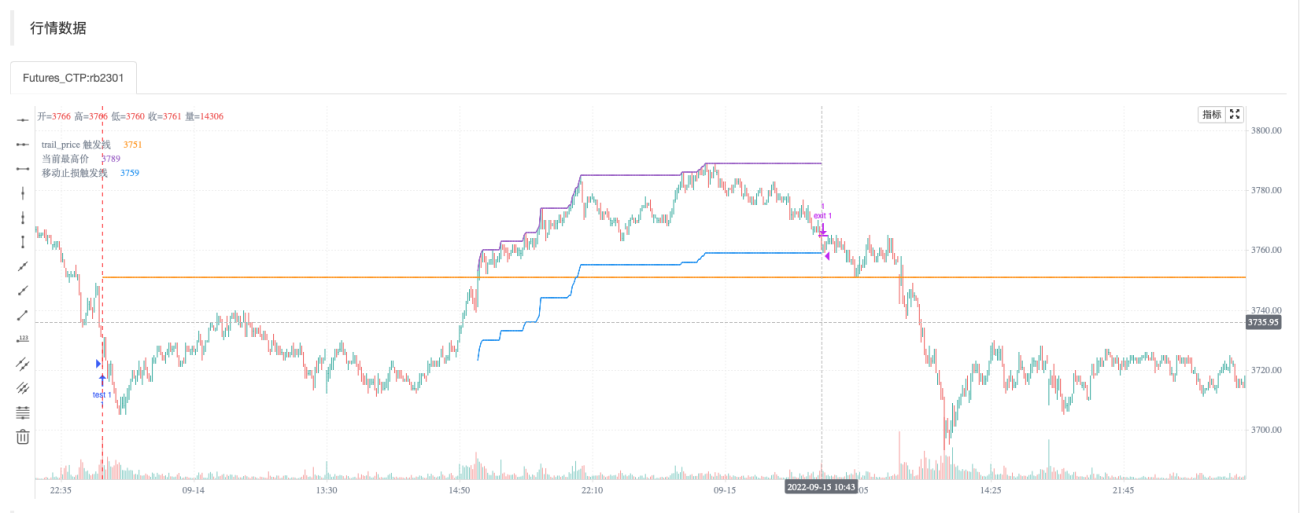
可以观察到紫色的线与蓝色的线始终保持30元的距离(即因为设置了strategy.exit函数的参数trail_offset=offset),动态调整跟随。当价格下降跌破蓝色的线时,立即执行了平仓操作。
测试时日志输出:
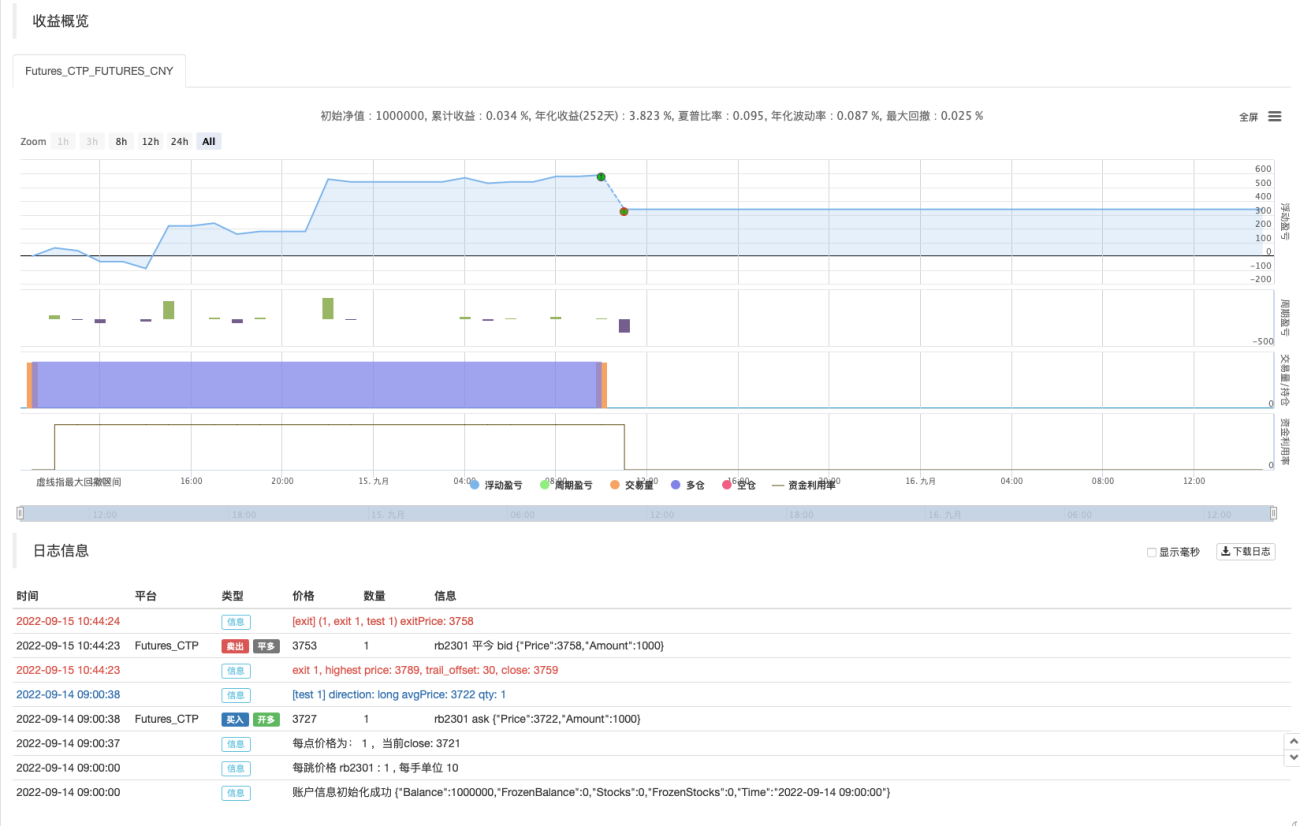
这样就实现了一次开仓、跟踪止盈止损操作。Pine语言是不是非常简单易用,便于设计。我们还可以把这样的止盈止损设计到策略里。例如我们有一个超级趋势策略,我们可以在策略中加入这样跟踪止损止盈。
            pine

            /*backtest
start: 2022-03-01 09:00:00
end: 2022-09-21 15:00:00
period: 1d
basePeriod: 1m
exchanges: [{"eid":"Futures_CTP","currency":"FUTURES"}]
args: [["v_input_1",150],["RunMode",1,360008],["ContractType","rb2301",360008]]
*/

varip trail_price = na
varip offset = input(50, "offset")
varip tradeBarIndex = 0
// 0 : idle , 1 current_open , 2 current_close
varip state = 0

findOrderIdx(idx) =>
    ret = -1
    if strategy.opentrades == 0
        ret
    else
        for i = 0 to strategy.opentrades - 1
            if strategy.opentrades.entry_id(i) == idx
                ret := i
                break
        ret

if strategy.position_size == 0
    trail_price := na
    state := 0

[superTrendPrice, dir] = ta.supertrend(input(2, "atr系数"), input(20, "atr周期"))

if ((dir[1] < 0 and dir[2] > 0) or (superTrendPrice[1] > superTrendPrice[2])) and state == 0 and tradeBarIndex != bar_index
    strategy.entry("open", strategy.long, 1)
    state := 1
else if ((dir[1] > 0 and dir[2] < 0) or (superTrendPrice[1] < superTrendPrice[2])) and state == 0 and tradeBarIndex != bar_index
    strategy.entry("open", strategy.short, 1)
    state := 1


// 反向信号,全平
if strategy.position_size > 0 and dir[2] < 0 and dir[1] > 0
    strategy.cancel_all()
    strategy.close_all()
    runtime.log("趋势反转,多头全平")
else if strategy.position_size < 0 and dir[2] > 0 and dir[1] < 0
    strategy.cancel_all()
    strategy.close_all()
    runtime.log("趋势反转,空头全平")


if not barstate.ishistory and findOrderIdx("open") >= 0 and state == 1
    trail_price := strategy.position_size > 0 ? close + offset : close - offset
    strategy.exit("exit", "open", 1, trail_price=trail_price, trail_offset=offset)
    runtime.log("每点价格为:", syminfo.mintick, ",当前close:", close, ",trail_price:", trail_price)
    state := 2
    tradeBarIndex := bar_index


plot(superTrendPrice, "superTrendPrice", color=dir>0 ? color.red : color.green, overlay=true)
仅仅只用在策略里加上:
            if not barstate.ishistory and findOrderIdx("open") >= 0 and state == 1
    trail_price := strategy.position_size > 0 ? close + offset : close - offset
    strategy.exit("exit", "open", 1, trail_price=trail_price, trail_offset=offset)
    runtime.log("每点价格为:", syminfo.mintick, ",当前close:", close, ",trail_price:", trail_price)
    state := 2
    tradeBarIndex := bar_index
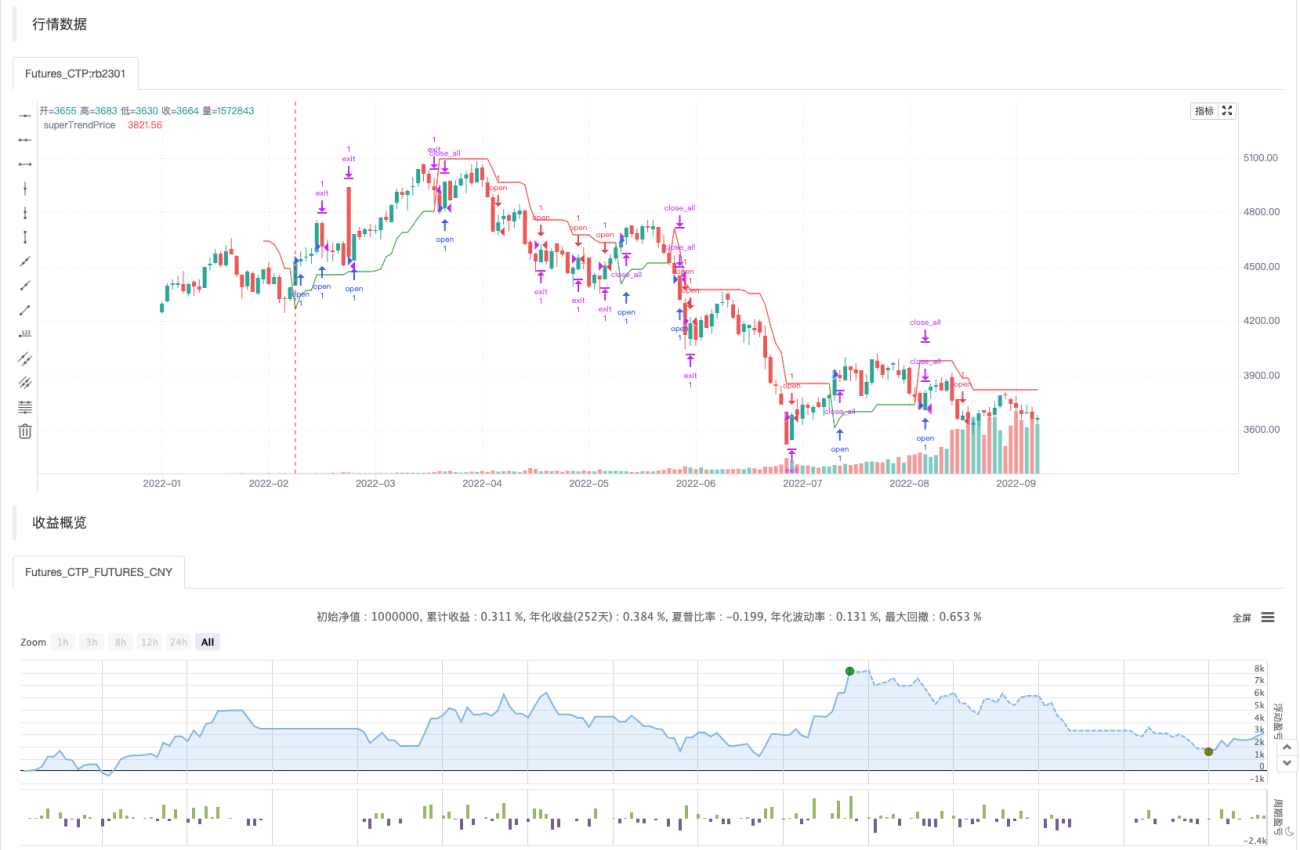
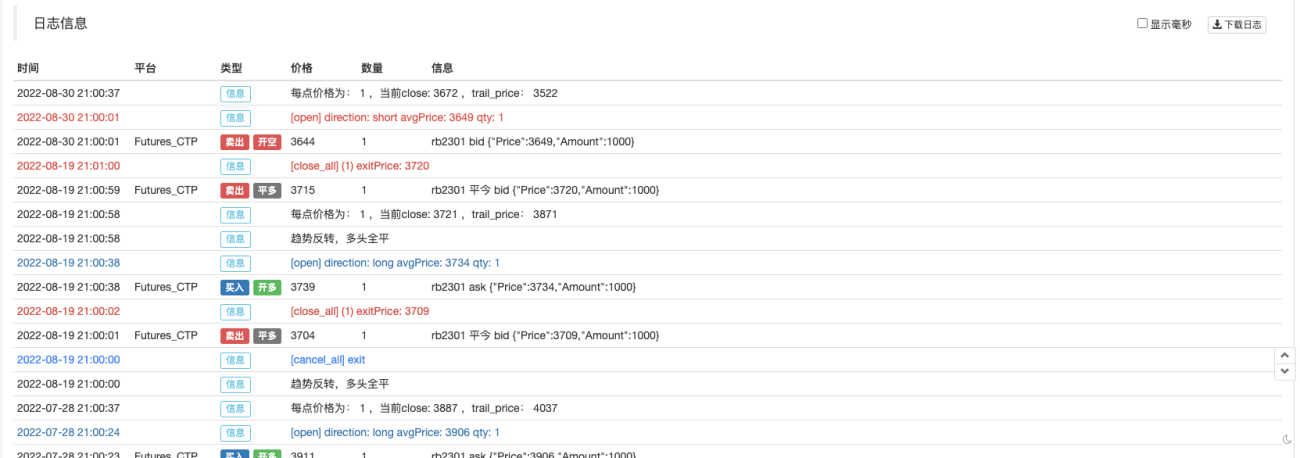
就让策略拥有了跟踪止盈止损的功能,那么如何在其它语言中设计跟踪止损、止盈呢?其实和Pine语言上的逻辑是一样的,我们下期再来探讨如何使用python/javascript语言设计类似的跟踪止损止盈功能。
- 1